 DeckVault
An MTG card scanner that does the typing for you
Point your camera at a Magic card and it lands in your collection with a market price attached — and your decks immediately know you own it.
Get it on Google PlayFree · Android · iOS coming later
The real reason collections stay untracked
Every Magic player owns a pile that never got sorted. A draft box from three months ago. A trade binder that is half full and half wishful. A shoebox of commons that migrated out of a closet and now lives under the desk. You know roughly what is in there. You do not know what it is worth, and you cannot tell whether the card your next deck needs is already sitting in it.
What stops people is not laziness. It is typing. Four hundred loose cards means four hundred name lookups, and Magic names are unkind to thumbs — apostrophes, commas, hyphens, words you have to guess the spelling of before autocomplete will help. Most collections stay untracked because the first hour is miserable enough to end the project.
A card scanner deletes that hour. You hold the card up, the camera reads it, the card goes into your vault, and you pick up the next one. The job stops being data entry and becomes sorting — which is something collectors already do for fun.
When scanning beats searching
Scanning is not always the right tool. It wins decisively in a few specific situations, and it is worth knowing which ones so you do not fight the app.
Scan when the cards are in your hands. Bulk boxes, unsorted binders, the stack you just brought home from a draft or a trade night, the long box someone gave you when they quit the game. Anything where the bottleneck is volume rather than knowing what you want.
Search when the cards are not in your hands. Planning a build from a decklist you read online, pricing something before you buy it, adding a card you have not received yet. DeckVault has catalog search with suggestions that appear as you type, so a half-remembered name is usually enough.
In practice most collectors use both in one sitting: scan the physical pile, then search for the four cards they still need.
Two ways to scan
- Live camera. Point the phone at the card in front of you. Good light and a flat card do most of the work.
- A photo from your gallery. Already snapped a picture of a card at a shop or in a trade? Scan the photo instead of the card. Useful when the card is no longer with you.
The same scanner handles Pokémon TCG cards, so a mixed shoebox does not need two apps or two passes.
What happens after the scan
Getting the card identified is the easy half. The useful half is what the card connects to once it is in your vault.
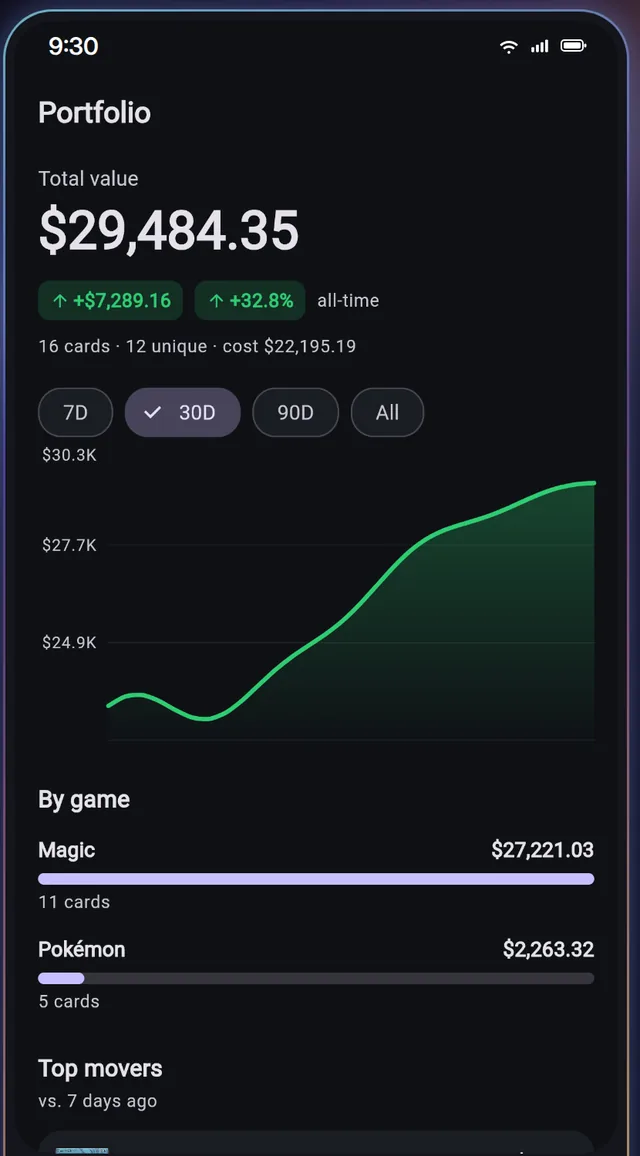
It gets a price
Real market prices for every card. Record what you paid and see + gains and losses per card and across the whole collection.
It joins the vault
One running total for everything you own, with Pokémon and Magic broken out separately instead of blurred into one number.
Your decks notice
Build a deck and DeckVault shows what you already own, what is missing, and what completing it would cost. Format legality is checked live as you build.
It can be shown off
Share decks and collection showcases with the community, and browse what other collectors are building.
A word about your photos
Scanning means pointing a camera at things in your home, so it is fair to ask where those images end up. Scan photos are never kept on our servers. The image is used to identify the card, and the card entry is what stays in your vault.
What stays behind is the card entry — name, printing, price — not the picture of your kitchen table.
Getting through a big pile without losing an evening
Some hobby habits make bulk scanning much faster, whatever app you use:
- Sort before you scan, roughly. Pull the obvious bulk commons into their own stack. Scanning every last common is rarely worth the minutes — bulk is priced by the thousand for a reason.
- Sleeve nothing yet. Glare from a sleeve is an easy way to spoil a read. Scan bare, sleeve afterwards.
- Flat light, no shadows. A ceiling light behind you beats a lamp beside you.
- Work in batches. Thirty cards, then a break. It keeps the pile from feeling infinite.
- Do the binder first. The cards you already thought were worth sleeving are the ones whose value you actually want to watch.
Once the first pass is done, upkeep is trivial: scan new cards on the day they arrive and the collection stays honest by itself.
Questions collectors ask
Does the scanner work for Pokémon cards too?
Yes. DeckVault covers Pokémon TCG and Magic: The Gathering, and both games live in the same vault with the same scanner.
Can I scan a photo instead of using the camera live?
Yes. You can scan a photo from your gallery, which is handy for cards you photographed but do not physically have.
Do you keep the photos I scan?
No. Scan photos are never kept on our servers.
What if a card will not scan?
Fall back to catalog search. Suggestions appear as you type, so you can add the card by name and carry on with the pile.
What does it cost?
Free to start: track up to 100 cards and build 2 decks. DeckVault Pro unlocks the full collection and unlimited decks for $4.99/month or $49.99/year.
Point your camera at the pile
Free to start — track up to 100 cards and build 2 decks, on Android.